How Do I Use Search Live to Identify Dashboard Signs:
You are driving home after a long day when a strange symbol lights up on your dashboard. You have no idea what it means. You cannot pull over to check the manual. What do you do?
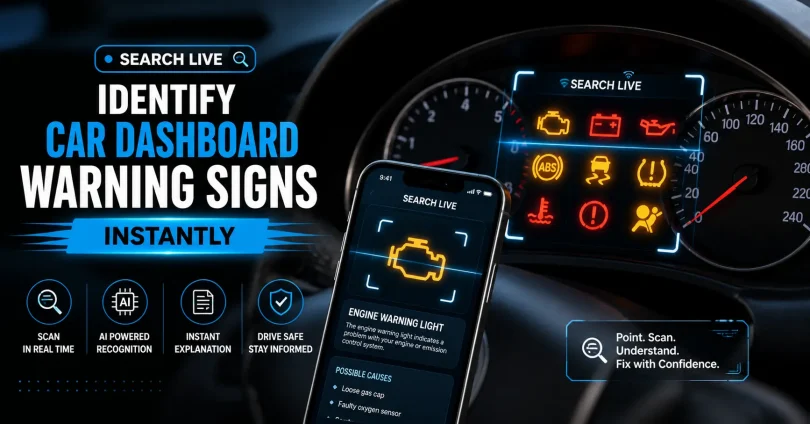
This is exactly what Search Live is built for. In this guide, you will learn how to use Search Live and other real-time visual search tools to identify every sign on your car dashboard, understand what it means, know how urgent it is, and take the right action immediately.
This guide goes further than anything else available online. You will find not just what each light means, but what to do next, what mistakes to avoid, how different car brands display the same warning differently, and how to use the tool even if it fails the first time.
What This Guide Covers
- What Is Search Live and How Does It Work for Dashboard Signs?
- Step-by-Step: How to Use Search Live on Your Dashboard Right Now.
- Understanding Dashboard Warning Light Colors and What They Mean.
- Complete Guide to the 20 Most Common Dashboard Warning Signs.
- Flashing vs. Steady Warning Lights: A Critical Difference.
- What to Do When Search Live Cannot Identify the Symbol.
- How Dashboard Warning Signs Differ by Car Brand.
- The 7 Most Dangerous Mistakes Drivers Make with Warning Lights.
- How to Prevent Dashboard Warnings from Appearing .
- Frequently Asked Questions.
- Final Checklist Before You Drive Again.
What Is Search Live and How Does It Work for Dashboard Signs?
Search Live is a real-time visual search capability built into modern smartphones and search applications. When you point your phone camera at an object, the app analyzes what it sees and returns instant information about it. For car dashboard warning signs, this means you can scan a symbol and get its name, meaning, severity level, and recommended action in seconds.
The most widely used Search Live tools for identifying dashboard symbols are:
- Google Lens (available in the Google app and Google Photos on Android and iOS)
- Samsung Bixby Vision (pre-installed on Samsung Galaxy devices)
- Apple Visual Look Up (available on iPhone running iOS 15 or later via the Photos app)
- Microsoft Bing Visual Search (available via the Bing app)
- Dedicated car health apps such as FIXD, Torque, and CarScanner OBD2
These tools use a combination of image recognition, machine learning, and live database access to match what the camera sees against millions of known symbols. The process takes under three seconds in most cases.
How Search Live Differs from a Regular Web Search
A regular web search requires you to describe the symbol in words, which is often difficult when you have never seen it before. Search Live removes that barrier entirely. You do not need to know the name of the symbol. You simply show it to your phone, and the tool identifies it for you.
Step-by-Step: How to Use Search Live on Your Dashboard Right Now
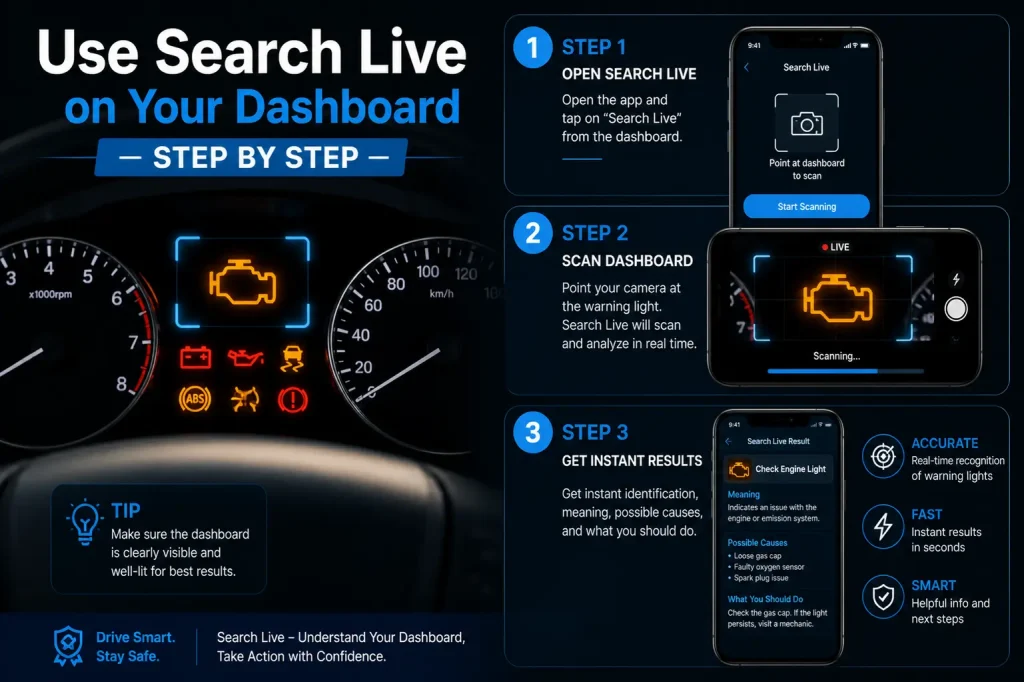
Follow these exact steps to identify any dashboard warning symbol using Search Live:
Using Google Lens (Recommended for Most Phones)
- Open the Google app on your Android or iOS phone.
- Tap the camera icon inside the search bar. This opens Google Lens.
- Point the camera directly at the dashboard warning symbol. Try to fill the frame with just the symbol.
- Hold the camera steady for one to two seconds until the app locks focus.
- Tap the shutter button or allow auto-capture. Google Lens will scan the symbol.
- Read the results panel that appears at the bottom of the screen. It will show you the symbol name, its meaning, and a link to more information.
- Tap on the search results to get detailed explanations, including what action you should take.
Using Apple Visual Look Up on iPhone
- Open the Camera app and take a clear photo of the dashboard warning symbol.
- Open the photo in your Photos app.
- Tap the information icon (the circle with an i inside) at the bottom of the screen.
- If Visual Look Up recognizes the symbol, you will see a dedicated button with a sparkling stars icon. Tap it.
- Review the results that appear and follow the guidance shown.
Pro Tip: Get the best scan results every time Turn on your interior lights or use a torch to illuminate the dashboard. The clearer and brighter the symbol, the faster and more accurately Search Live can identify it. Avoid scanning through the windshield from outside the car, as reflections reduce accuracy.
Using Google Lens via the Google Photos App
- Take a photo of the dashboard symbol with your phone camera.
- Open Google Photos and select the image.
- Tap the Lens icon (the camera-with-a-circle icon) in the image toolbar.
- Review the search results that appear.
If the Symbol Is Too Small to Capture Clearly
- Move your phone closer to the dashboard, within five to eight centimetres of the symbol.
- Use your phone’s portrait or macro mode if available.
- Take the photo first, then zoom in on the symbol using your gallery, and run Lens on the zoomed image.
- Take the photo from directly in front of the symbol, not at an angle.
Understanding Dashboard Warning Light Colors and What They Mean
Every dashboard warning light follows a universal color-coding system. Understanding this system allows you to instantly gauge urgency before you even know what the symbol means.
| Color | Urgency Level | What It Means | Your Immediate Action |
| Red | Critical | A serious fault that can cause immediate harm to the vehicle or driver | Stop the car safely as soon as possible. Do not continue driving. |
| Amber / Orange / Yellow | Moderate | A system needs attention soon but is not immediately dangerous | Drive carefully to a mechanic or service center within the day. |
| Green | Informational | A system or feature is active and working correctly | No action needed. This is a confirmation light. |
| Blue | Informational | A specific system is currently engaged | No action needed. Turn off high beams if you see blue headlamp light. |
| White | Informational | A driver assistance or comfort feature is active | No action needed in most cases. |
One important rule: when a light comes on as you start the car and then turns off within a few seconds, this is a normal self-check. Every modern car runs a diagnostic cycle at startup. A light that stays on after the car is running is the one that requires attention.
Complete Guide to the 20 Most Common Dashboard Warning Signs
The following covers every major dashboard warning sign you are likely to see, along with its color, meaning, severity, and exactly what you should do. Competitors only list a handful of these. This is the complete picture.
Red Warning Lights: Stop or Act Immediately
| Symbol Name | What It Looks Like | What It Means | What You Must Do |
| Oil Pressure Warning | An old-fashioned oil can with a drop falling from the spout | Oil pressure has dropped dangerously low. The engine is not being lubricated. | Pull over and stop immediately. Check the oil level. If correct, do not restart. Call a mechanic. |
| Engine Temperature Warning | A thermometer submerged in wavy liquid | The engine is overheating. Coolant may be low or the cooling system is failing. | Stop the car immediately. Turn off the engine. Allow it to cool for 30 minutes before checking coolant. Never open the radiator cap while hot. |
| Battery / Charging System | A rectangle representing a battery with a plus and minus sign | The battery is not being charged by the alternator. The car will stop running when battery power runs out. | Drive directly to the nearest garage. Avoid using high-drain electronics. Turn off the AC, heated seats, and audio system. |
| Brake System Warning | An exclamation mark inside a circle, sometimes with the letter P | Brake fluid is critically low, handbrake is on, or there is a fault in the brake system. | Check if the handbrake is released. If light stays on, do not drive. Have brakes inspected immediately. |
| Airbag / SRS Warning | A figure in a seat with a circle in front representing the airbag | The supplemental restraint system has a fault. Your airbags may not deploy in a crash. | Drive to a certified mechanic as soon as possible. Avoid driving at high speed or in heavy traffic until resolved. |
| Door Ajar Warning | A car shape with an open door outline | One or more doors or the boot is not fully closed. | Stop safely. Check and firmly close all doors, including the boot and bonnet. |
| Seat Belt Reminder | A figure in a seat with a diagonal strap across the chest | Driver or passenger has not fastened their seat belt. | Fasten all seat belts before continuing. |
Amber / Orange Warning Lights: Attend to Soon
| Symbol Name | What It Looks Like | What It Means | What You Must Do |
| Check Engine / Engine Management Light | An engine silhouette or the words CHECK ENGINE | A sensor or component in the engine or emissions system has logged a fault code. | Do not ignore. Book a diagnostic scan at a garage. The car may be safe to drive short distances but further delay risks engine damage. |
| Tyre Pressure Monitoring System (TPMS) | A cross-section of a tyre with an exclamation mark inside | One or more tyres has dropped below the recommended inflation pressure. | Stop and check all tyre pressures using a gauge. Inflate to the level shown in your driver’s door jamb sticker. |
| ABS Warning Light | The letters ABS inside a circle | The Anti-lock Braking System has detected a fault. Normal braking still works but ABS protection is disabled. | Drive cautiously to a garage. Avoid heavy braking if possible. |
| Traction Control / Stability Warning | A car with wavy lines beneath the rear wheels | The traction control or electronic stability program has been triggered or has a fault. | If it flashes briefly, the system is working. If it stays on, have the system inspected. |
| Diesel Particulate Filter (DPF) Warning | A series of dots or a filter symbol | The DPF is becoming clogged with soot and needs regeneration. | Take the car for a 20-minute motorway or dual carriageway drive at over 60 km/h to burn off the soot. |
| Power Steering Warning | A steering wheel with an exclamation mark | The electric or hydraulic power steering has a fault. The wheel may become very heavy to turn. | Pull over safely. Restart the car. If the light stays on, drive carefully to a garage at low speeds. |
| Fuel Level Warning | A petrol pump icon | Fuel is critically low. The reserve is almost empty. | Fill up immediately. Most cars have approximately 50 km of range remaining when this light appears. |
| Glow Plug Warning (Diesel Only) | A coiled spring-like symbol | The glow plugs used to heat the diesel engine for starting are warming up or have a fault. | If it flashes while driving, a glow plug has failed. Visit a mechanic. |
| AdBlue / SCR Warning (Diesel) | A water droplet with the letters DEF or AdBlue | The AdBlue exhaust treatment fluid is running low. | Top up the AdBlue tank as soon as possible to avoid engine power restrictions. |
| Transmission / Gearbox Warning | A gear icon or a thermometer inside a gear | The gearbox has overheated or detected a fault. | Stop and allow to cool. If the light stays on after cooling, drive gently to a garage. |
Green and Blue Information Lights: No Action Required
| Symbol Name | Color | What It Means |
| High Beam Headlights Active | Blue | Full beam headlights are switched on. |
| Cruise Control Active | Green | Cruise control is set and maintaining your selected speed. |
| Turn Signal / Indicator | Green | The left or right indicator is flashing. |
| Fog Lights Active | Green or Amber | Front or rear fog lights are switched on. |
| Lane Keep Assist Active | Green | The lane departure warning or assist system is monitoring road markings. |
Flashing vs. Steady Warning Lights: A Critical Difference That Most Guides Miss
Competitors rarely explain this, but the behavior of a warning light matters just as much as its color. A light that flashes carries a very different meaning to one that stays on steadily.
| Light Behavior | What It Means | Urgency |
| Steady / Constant On | The system has detected a stored fault that persists. The car’s computer has logged a diagnostic trouble code. | Moderate to High. Service required but car is usually driveable to a garage. |
| Flashing / Blinking | An active or worsening fault is occurring right now. This is more serious than a steady light. | High to Critical. Stop driving soon and have the car inspected immediately. |
| Flashing then Steady | The system triggered an active fault that has now been logged. The immediate danger has passed but the fault remains. | Moderate. Have it checked that day. |
| On at Startup then Off | Normal diagnostic self-check. All systems are testing themselves. | None. This is expected behavior in every modern car. |
Critical Rule: A flashing check engine light (engine management light) is not the same as a steady one. A steady light means book a service. A flashing light means stop driving within the next few kilometres. A flashing engine management light almost always indicates engine misfiring, which can damage the catalytic converter within minutes if driving continues.
6. What to Do When Search Live Cannot Identify the Symbol
Search Live is extremely capable, but it is not perfect. Here is a structured fallback process to use when the tool does not return a clear result:
- Improve the image quality. Try again with better lighting and a steadier hand. Clean the dashboard area around the symbol with a dry cloth to remove dust or reflections.
- Search by description. Open Google or Bing and type a description of the shape: for example, type ‘car dashboard symbol thermometer wavy lines red’ and browse image results.
- Check your owner’s manual. Every car includes a dashboard symbols guide in its manual. This is usually found in the index under ‘Warning Lights’ or ‘Instrument Panel.’ If you do not have the physical manual, search for your car make, model, and year followed by ‘owner’s manual PDF.’
- Use a brand-specific app. Manufacturers such as Toyota, Volkswagen, BMW, and Hyundai have official smartphone apps that include symbol identification and live diagnostics.
- Use an OBD2 scanner. A Bluetooth OBD2 dongle plugged into your car’s diagnostic port (usually located under the steering column) pairs with a free app and reads the exact fault code stored in your car’s computer. This gives you a precise error code rather than a visual match.
- Visit a mechanic for a diagnostic scan. Garages run a code reader that retrieves the exact fault from the engine control unit within minutes. Many offer this service for free or at a low cost.
How Dashboard Warning Signs Differ by Car Brand
This is information that none of the competing articles provides. The same warning can look noticeably different depending on who made your car. If Search Live returns confusing results, knowing this can help you narrow down the correct identification.
| Warning Type | European Brands (BMW, VW, Audi, Mercedes) | Japanese Brands (Toyota, Honda, Suzuki, Hyundai) | Indian / Budget Brands (Maruti, Tata, Mahindra) |
| Engine Warning | Typically shows a stylized engine block outline with very detailed graphics | Often shows a simpler engine silhouette or uses text like ‘CHECK ENGINE’ | Most use the international standard symbols now, following updated AIS regulations |
| Oil Pressure | Red oil can with a drop. May also include a pressure gauge needle | Standard red oil can icon, often smaller in size | Standard symbol; older budget models may show text ‘OIL’ in addition to the icon |
| Service Reminder | Often shows a spanner / wrench or a clock with a car | May use a spanner, a car outline with service text, or a maintenance minder code like ‘B12’ | May display ‘SERVICE DUE’ text without a symbol on older models |
| Tyre Pressure | Most have TPMS as standard. Uses the cross-section tyre symbol | Common on models from 2015 onwards. Same standard symbol | Mandatory on new cars in India from 2022. Some older models use a simple exclamation mark only |
| Gearbox / Transmission | A gear with a thermometer is common in DSG and automatic models | Honda and Toyota use a gear symbol with wavy heat lines | Less common on manual cars; automatic variants follow international standards |
The 7 Most Dangerous Mistakes Drivers Make with Dashboard Warning Lights
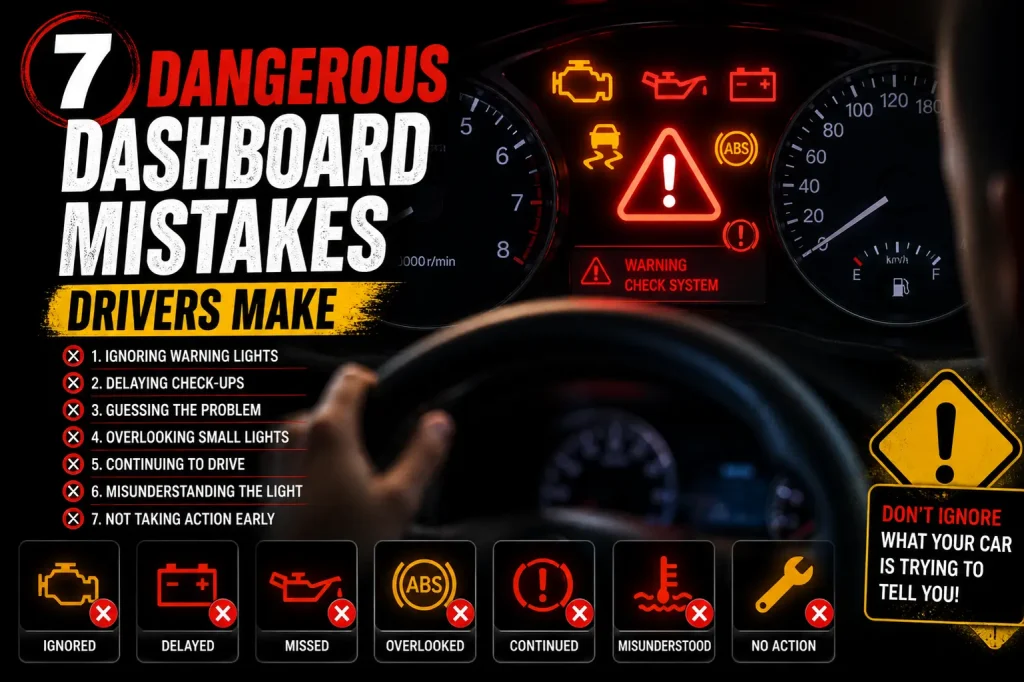
Understanding what a warning light means is only half the battle. The other half is not making these common errors:
- Covering the warning light with tape. This does not fix the problem. It makes you blind to a fault that could destroy your engine or fail your brakes.
- Assuming the light will go away on its own. Some lights do reset automatically, but only after the underlying problem has been fixed. A light that disappears without repair simply means the fault is now stored in memory, not that it is gone.
- Ignoring a red light and continuing to drive normally. A red oil pressure or engine temperature warning can cause total engine failure within minutes. The repair cost for an ignored red light is typically five to ten times higher than if the car had been stopped immediately.
- Topping up coolant or oil while the engine is hot. Opening the radiator cap on a hot engine releases pressurised steam that causes serious burns. Always wait at least 30 minutes after stopping.
- Confusing the brake warning light with the handbrake indicator. Both are often the same symbol. Always check the handbrake first. If the handbrake is fully released and the light stays on, the brake system has a genuine fault.
- Searching for the symbol while still driving. Always pull over before using your phone. Use Search Live only when parked safely.
- Relying on Search Live alone for critical decisions. Use it as a first step to understand the symbol. For red warning lights and unfamiliar faults, always follow up with a mechanic.
How to Prevent Dashboard Warnings from Appearing
Prevention is always better than a roadside emergency. These habits keep your dashboard warning-free:
| Maintenance Task | How Often | Why It Prevents Dashboard Warnings |
| Check engine oil level | Every two weeks or every 1,000 km | Prevents oil pressure warning and engine damage |
| Check coolant level | Monthly | Prevents engine temperature warning and overheating |
| Check tyre pressures | Every two weeks, before long trips | Prevents TPMS warning, improves fuel economy, reduces tyre wear |
| Inspect brake fluid level | Every three months | Prevents brake warning and maintains braking performance |
| Carry out scheduled service | As per manufacturer schedule, typically every 10,000 to 15,000 km | Resets service reminders, identifies faults before they become warnings |
| Test battery health | Annually, especially before winter | Prevents battery warning and avoids breakdowns in cold weather |
| Check all exterior lights | Monthly | Prevents bulb failure warning lights on newer cars |
| Top up AdBlue (diesel) | When prompted, typically every 8,000 to 12,000 km | Prevents AdBlue warning and engine power restrictions |
Frequently Asked Questions
How do I use Search Live to identify the signs showing on my car dashboard?
Open Google Lens on your smartphone, point the camera at the dashboard symbol, and hold steady for one to two seconds. The app will identify the symbol and provide its meaning and recommended action. For best results, ensure the dashboard is well lit and capture only the symbol in the frame.
Is Search Live accurate enough for car dashboard symbols?
Google Lens and similar tools are highly accurate for standard dashboard symbols that follow international ISO standards. Accuracy drops slightly for older or unusual brand-specific symbols. In those cases, use your owner’s manual or an OBD2 scanner as a backup.
Can I use Search Live while driving?
No. You must never use your phone while driving. Pull over safely, apply the handbrake, and then use Search Live to identify the symbol. Using a phone while driving is illegal and extremely dangerous.
What is the most dangerous dashboard warning light?
The oil pressure warning light is considered the most dangerous because engine damage begins within seconds of the oil pressure dropping to zero. The engine temperature warning is a close second. Both require you to stop the vehicle immediately.
Will my car fail an MOT or roadworthiness test if a warning light is on?
Yes. In most countries, a dashboard warning light that remains on after the vehicle’s startup self-check is a reason for failing a mandatory vehicle inspection. Any active fault registered by the car’s computer that triggers a warning light must be repaired and cleared before the vehicle will pass.
Can low fuel quality trigger dashboard warning lights?
Yes. Low-quality or contaminated fuel can trigger the engine management light, the catalytic converter warning, and in some cases the fuel pressure warning. Using the correct grade of fuel as specified in your owner’s manual prevents this.
Do dashboard warning lights reset automatically after the problem is fixed?
Most warning lights reset automatically once the underlying fault has been corrected and the car’s computer confirms the system is working normally. Some lights, particularly after brake system repairs or airbag work, must be manually reset using a diagnostic tool by a mechanic.
What if the same warning light keeps coming back after being reset?
A recurring warning light means the root cause has not been fixed, even if the light was cleared. A diagnostic scan will reveal the stored trouble code. Repeated clearing without repair will not solve the issue and may cause worsening damage.
Can I use an OBD2 scanner instead of Search Live?
Yes, and for precise fault diagnosis, an OBD2 scanner is actually more accurate than a visual scan. It reads the exact fault code stored in your car’s engine control unit. However, OBD2 scanners require the correct app and a Bluetooth dongle, while Search Live requires nothing except your phone. Use Search Live for immediate identification and an OBD2 scanner for a deeper investigation.
Does Search Live work on dashboard symbols for electric and hybrid vehicles?
Yes. Electric and hybrid vehicles have additional dashboard symbols related to battery charge level, regenerative braking status, charging system faults, and electric motor temperature. Google Lens and other visual search tools recognize these symbols just as well as those on conventional petrol or diesel cars.
Final Checklist Before You Drive After Seeing a Warning Light
Use this checklist every time a warning light appears:
| Step | Action | Done? |
| 1 | Pull over safely and apply the handbrake before picking up your phone. | [ ] |
| 2 | Note the color of the light: red, amber, or green / blue. | [ ] |
| 3 | Note the behavior of the light: steady, flashing, or flashing then steady. | [ ] |
| 4 | Open Google Lens and scan the symbol clearly. | [ ] |
| 5 | Read the meaning and urgency level from the search result. | [ ] |
| 6 | If the light is red or flashing, call a mechanic before driving further. | [ ] |
| 7 | If the light is amber and steady, drive carefully to a garage the same day. | [ ] |
| 8 | If Search Live cannot identify it, use your owner’s manual or an OBD2 scanner. | [ ] |
| 9 | Take a photo of the warning light for your records before it is repaired. | [ ] |
| 10 | Confirm the light has cleared after the repair is completed. | [ ] |
Conclusion
Your dashboard is your car’s way of communicating with you. Every warning symbol carries a message designed to protect you, your passengers, and your vehicle. With Search Live built into the phone you already carry, you no longer need to guess or wait until you reach home to look up the answer.
The key is knowing how to use the tool correctly, understanding the color and behavior of each light, and knowing exactly what to do the moment one appears. Use this guide as your definitive reference and share it with everyone you know who drives.
Stay alert. Act fast. Drive safe.
Disclaimer
This article is for informational purposes only. Dashboard warning symbols can vary by vehicle manufacturer, model year, and region. Always consult your vehicle’s official owner’s manual and seek diagnosis from a certified mechanic for any active warning light. Do not use your smartphone while driving.
You May Also Like It: